

Add a version
Every upload is a new, immutable version: nothing is edited and no earlier version is overwritten. You can add versions on the web, with the papers CLI or through MCP.
On the web
Section titled “On the web”- Open the work page and click Thêm phiên bản (Add version; only shown when you may upload versions).
- Drop the PDF and/or the LaTeX zip (zip up to 100 MB, each file up to 200 MB).
- Check the type, Nhãn (Label) and Tiêu đề phiên bản (Version title); turn on Bản ẩn danh (venue chấm mù) (Anonymous version, double-blind venue) if needed.
- Click Tạo phiên bản (Create version).
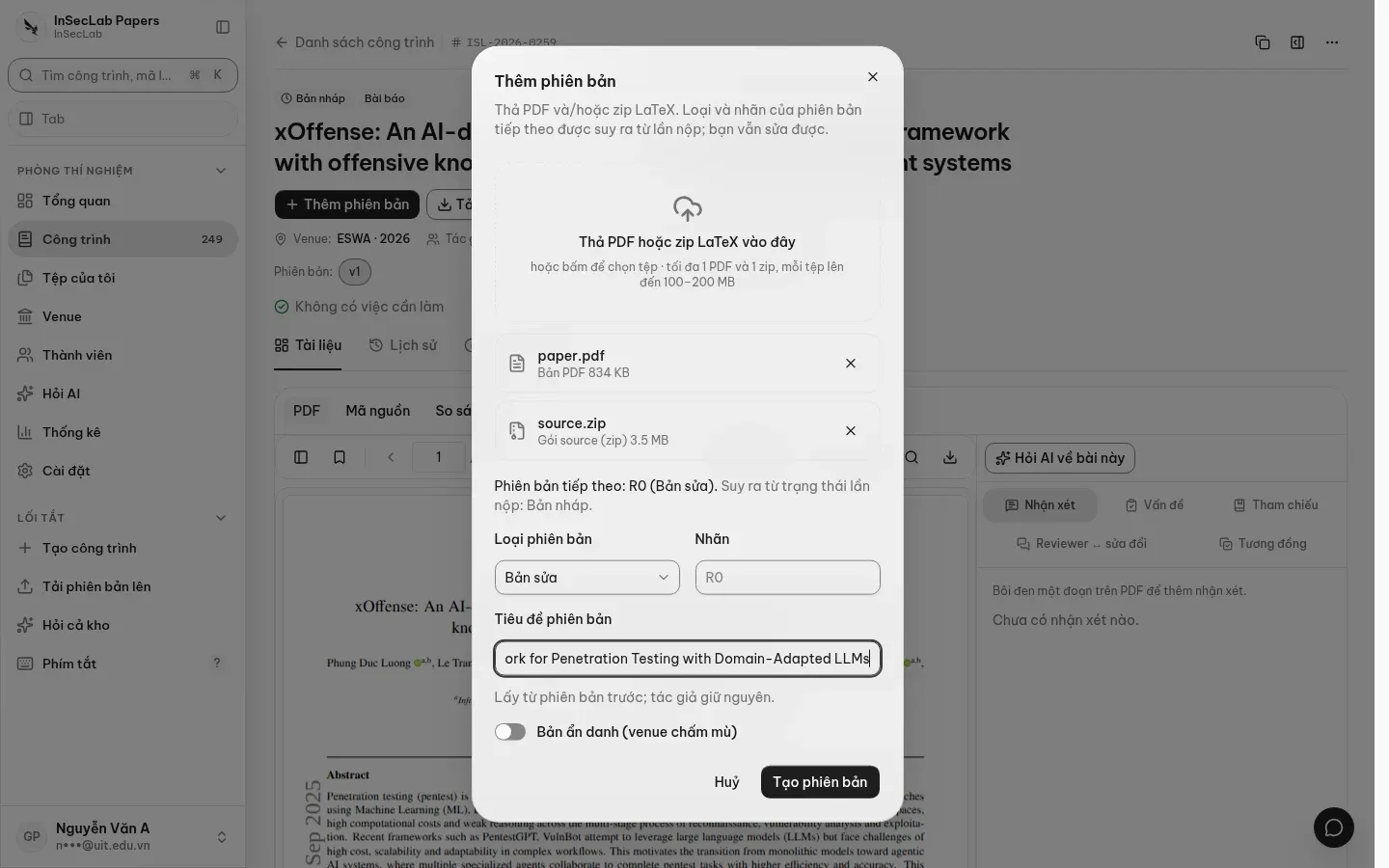
The version type is inferred from the submission status; you can still change it:
| Submission is at | Suggested type |
|---|---|
accepted, camera_ready |
Camera-ready |
published |
Đã xuất bản (Published) |
major_revision, minor_revision, rebuttal_open |
Bản sửa (Revision) |
| No version yet | Bản nộp (Submission) |
| Anything else | Journal: Revision; conference: Camera-ready |
Labels are generated (v1, R1, Camera-ready…). For a double-blind venue the version is marked anonymous automatically. The title is taken from the previous version; edit it if the paper was renamed.
You can also create a version from files you already have: in My files, select a zip and a PDF, then Tạo phiên bản từ file (Create version from files).
After upload: checks and indexing run automatically
Section titled “After upload: checks and indexing run automatically”When the version has all files required for its type, the system runs the 7 deterministic checks (zip integrity, compile, source–PDF match, latexdiff, source cleanup, anonymity, template and page count) and indexes it for Ask AI. The reference check, similarity and reviewer cross-check run from their own panels.
| Type | Required files |
|---|---|
| Submission | PDF + zip |
| Revision | PDF + zip + reviews + decision letter + response letter |
| Camera-ready, Published, Preprint |
The web dialog only accepts a PDF and a zip, so for a Revision click Chạy lại tất cả (Rerun all) in the Vấn đề (Issues) panel to check right away, or upload the other three documents with the CLI (--review, --decision, --response). Results are covered in Reading check results.